
Fydo Logo
  • Pricing
Get a Free Demo
Loading
WhatsApp
Fydo Logo

Built for Shops

Loved by Shoppers.

Loved by those who sell. Loved by those who shop. Loyalty, the Fydo way : )

Get AI summary

Product

Loyalty ManagementWhatsApp MarketingCustomer CampaignsReferral

Solutions

Fashion & ApparelSalons & BeautyJewellery ShopsGrocery StoresRestaurants & Bars

Company

About usContact UsPartner with FydoTerms and ConditionsPrivacy PolicyRefund Policy

© Lfyd services private limited • All rights reserved

  1. Home
  2. Resources
  3. Guides
  4. Plan your first programme

How to plan your first loyalty programme

Choose one goal, one reward and sensible limits, then switch it on. This guide follows the same steps as the Fydo Partner app.

Get a Free DemoAll guides

Before you start

What you need, and what you will be able to do.

  • Time15 minutes
  • LevelBeginner
  • SourceBased on the Fydo Partner app

You will need

  • The Fydo Partner app
  • A rough idea of your margin on a typical bill
  • One goal you want to reach this month

You will be able to

  • Pick a goal, a reward and what earns it
  • Set sensible limits on the Set the details screen
  • Check what the reward costs against your margin

The steps

Follow them in order. Each step shows the real app screen where there is one.

In this guide
  1. 1Pick one goal for the first month
  2. 2Choose how you will reward customers
  3. 3Choose what earns the reward
  4. 4Set the details
  5. 5Review the message and switch it on
  6. 6Make it easy to take part
  7. 7Look at the numbers after one week
  • Try the planner
  • Your checklist
1

Pick one goal for the first month

Fydo starts with what you want to achieve, not with a long list of features. Four goals cover most shops:

  • Get customers to come back for a second visit
  • Get customers to spend more
  • Fill your quiet hours
  • Win back customers who have stopped visiting

Choose one. A single goal is easier to run, easier for your staff to explain and easier to measure.
2

Choose how you will reward customers

There are three kinds of reward. You decide which one fits your shop.

  • Cashback. A percentage of the purchase goes back to the customer, held in a wallet for your shop.
  • Discount. Applied when the customer meets the conditions you set.
  • Free reward. A free product or service, claimed with a code.
Mind your margin

Every reward costs you something. A free item or service that costs you little can be easier to afford than a percentage back on every bill.

3

Choose what earns the reward

Next, decide what a customer has to do.

  • Every visit, for the simplest programme.
  • A visit goal. For example, a free item after the fifth visit. Fydo counts each qualifying visit.
  • A spend goal. In one bill, or across several purchases in a week or a month.
  • A time or an occasion. Quiet hours, a festival or a date range.

If more than one reward could apply to a bill, the largest eligible reward is applied.

4

Set the details

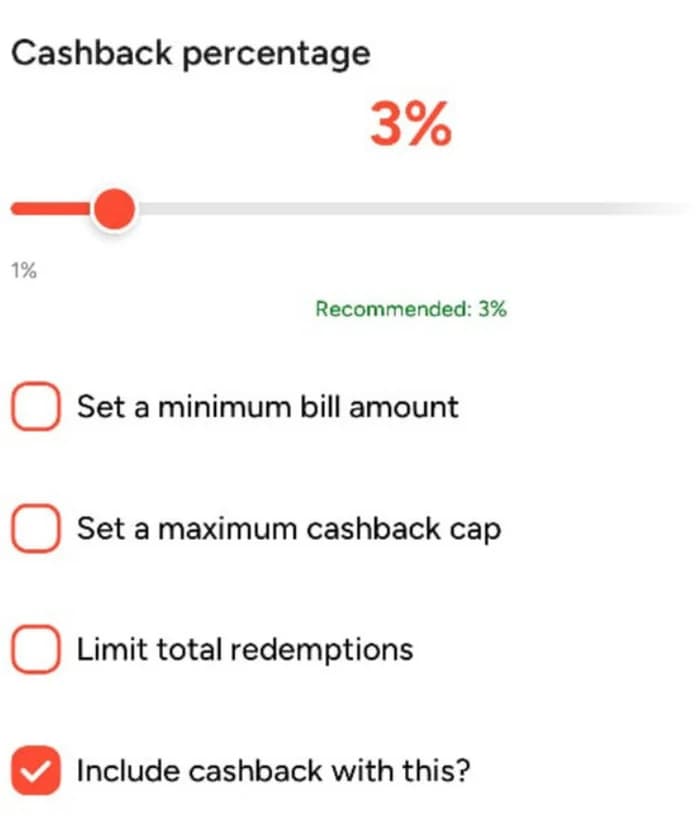
This is the screen where you fine-tune the offer. Move the slider to set the cashback percentage. A Protect your margin hint suggests a range that suits bills of your size. Then choose the limits:

  • Set a minimum bill amount. The reward applies only above it.
  • Set a maximum cap. The most a customer can earn on one bill.
  • Limit total redemptions. A ceiling on how often the reward can be used.
  • The screen also asks whether to include cashback with this offer.

Start small and capped, then review after a week.

The lower part of the Set the details screen, showing a cashback slider and optional limits.
5

Review the message and switch it on

Customers hear about the reward on WhatsApp. Fydo suggests the wording. Read it, change anything that does not sound like you, and then activate the programme.

6

Make it easy to take part

Put your Fydo QR at the counter so customers can scan and pay with any UPI app. For cash and card, your staff enter the customer's phone number and the bill amount in the app.

The next guide shows exactly how.

7

Look at the numbers after one week

Open the app and look at new customers, repeat customers and how many rewards were used. Change one thing at a time, so you know what made the difference.

How to read your customer data explains what to look for.

Try the planner

Pick your kind of business and your goal, then check the reward against your own margin.

1. What kind of business do you run?

2. What do you want to change first?

3. Check the cost against your margin

Your starting point

Reward type
A free reward, a discount or cashback, after the first visit
What earns it
The first visit counts. The reward is for coming back within a window you set.
An example
On the second visit within 14 days, the customer gets a small cashback.
Limits to set
Choose a validity window and a minimum bill.
What to watch after a week
Repeat customers
Reward on a typical bill₹36
Your margin on that bill₹240
The reward uses15.0%

This leaves most of your margin intact.

Your checklist

Tick things off as you go. Copy the list to share it with your team.

Plan your first programme

0 of 10

Ticks are saved in this browser only.

Common mistakes

Easy to avoid once you know them.

  • Too many rules at once

    Complicated earning rules confuse customers and staff. Start with one reward.

  • A reward that is too far away

    If customers cannot see themselves reaching it, they stop trying.

  • Percentage off for everyone

    It eats margin and teaches customers to wait for offers.

  • Ignoring your margin

    A reward that looks generous can be unaffordable. Check the cost first.

  • Counting members as success

    People who join are already your best customers. Measure repeat visits instead.

Questions about this guide

Keep going

The next step in the learning path.

Next guideHow to record a bill at the counter

Related product pages

Loyalty ProgramsLoyalty program software for shops: choose cashback, points, rewards, QR loyalty and referrals.CashbackReturn a share of each bill as money back on a later purchase.QR loyalty and earning rulesJoin with a scan, then earn by visits, spend or occasions.

Want to see it with your own shop?

A demo is the fastest way to see how these steps fit your business.

Back to all guides