Fydo Logo
  • Pricing
Get a Free Demo
Loading
WhatsApp
Fydo Logo

Built for Shops

Loved by Shoppers.

Loved by those who sell. Loved by those who shop. Loyalty, the Fydo way : )

Get AI summary

Product

Loyalty ManagementWhatsApp MarketingCustomer CampaignsReferral

Solutions

Fashion & ApparelSalons & BeautyJewellery ShopsGrocery StoresRestaurants & Bars

Company

About usContact UsPartner with FydoTerms and ConditionsPrivacy PolicyRefund Policy

© Lfyd services private limited • All rights reserved

  1. Home
  2. Resources
  3. Guides
  4. Read your customer data

How to read your customer data

Fydo builds a profile for every customer who pays with their phone number. Here is how to read it and what to do next.

Get a Free DemoAll guides

Before you start

What you need, and what you will be able to do.

  • Time15 minutes
  • LevelBeginner
  • SourceBased on the Fydo Partner app

You will need

  • A few days of bills recorded in Fydo
  • Your existing customer list, if you have one

You will be able to

  • Bring in customers you already have
  • Read a customer profile and a customer list
  • Ask three useful questions every week

The steps

Follow them in order. Each step shows the real app screen where there is one.

In this guide
  1. 1Understand where the data comes from
  2. 2Bring in the customers you already have
  3. 3Open the customer list
  4. 4Read one customer
  5. 5Know the groups
  6. 6Ask three questions every week
  • Read a customer list
  • Your checklist
1

Understand where the data comes from

Every purchase recorded with a phone number adds to a customer profile. When you start using Fydo, your customer database builds itself, so you can see who your customers are, how they shop and when they come back.
2

Bring in the customers you already have

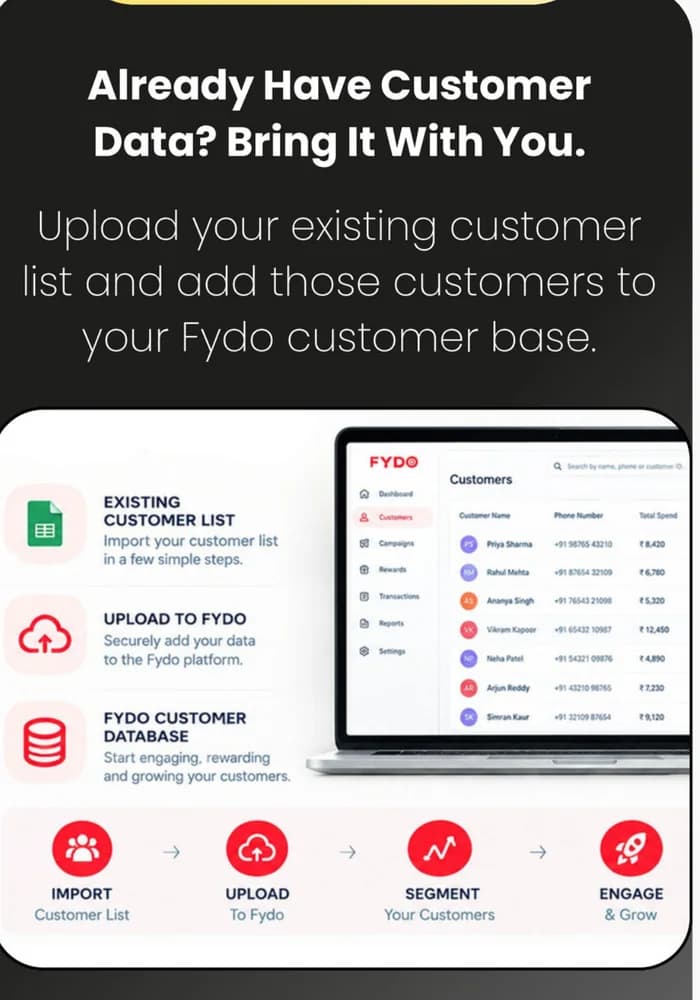
You do not have to start from zero. Upload your existing customer list, from your phone contacts or an Excel file, and add those customers to your Fydo customer base.

Check consent first

Before you message imported customers on WhatsApp, make sure they have agreed to hear from you. India's data protection rules, notified in November 2025, expect clear consent that people can withdraw. Ask your adviser what applies to you.

A screen showing how an existing customer list is uploaded to Fydo.
3

Open the customer list

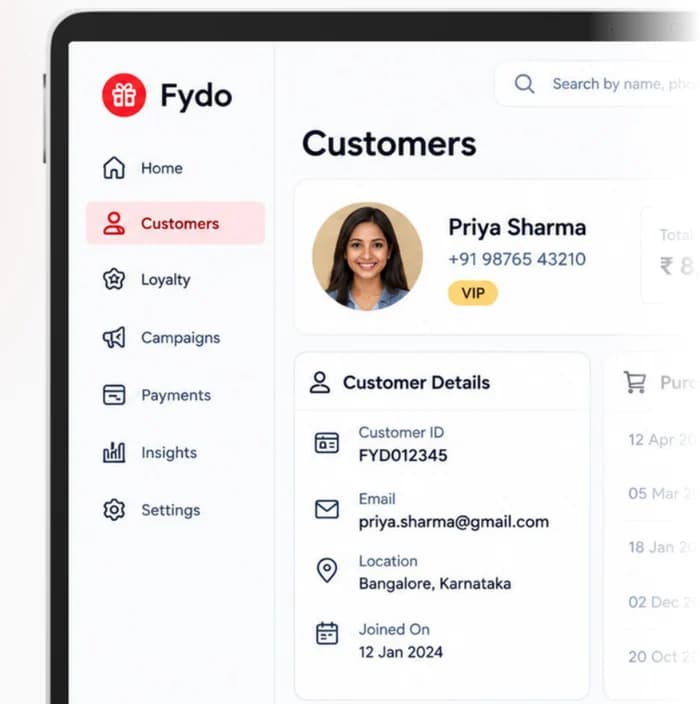
The Customers screen lists everyone in your database. Search by name, phone number or customer ID to find a person quickly.

The Fydo customer list on a laptop, with the menu, a customer profile and customer details.
4

Read one customer

Open a profile to see the whole relationship in one place.

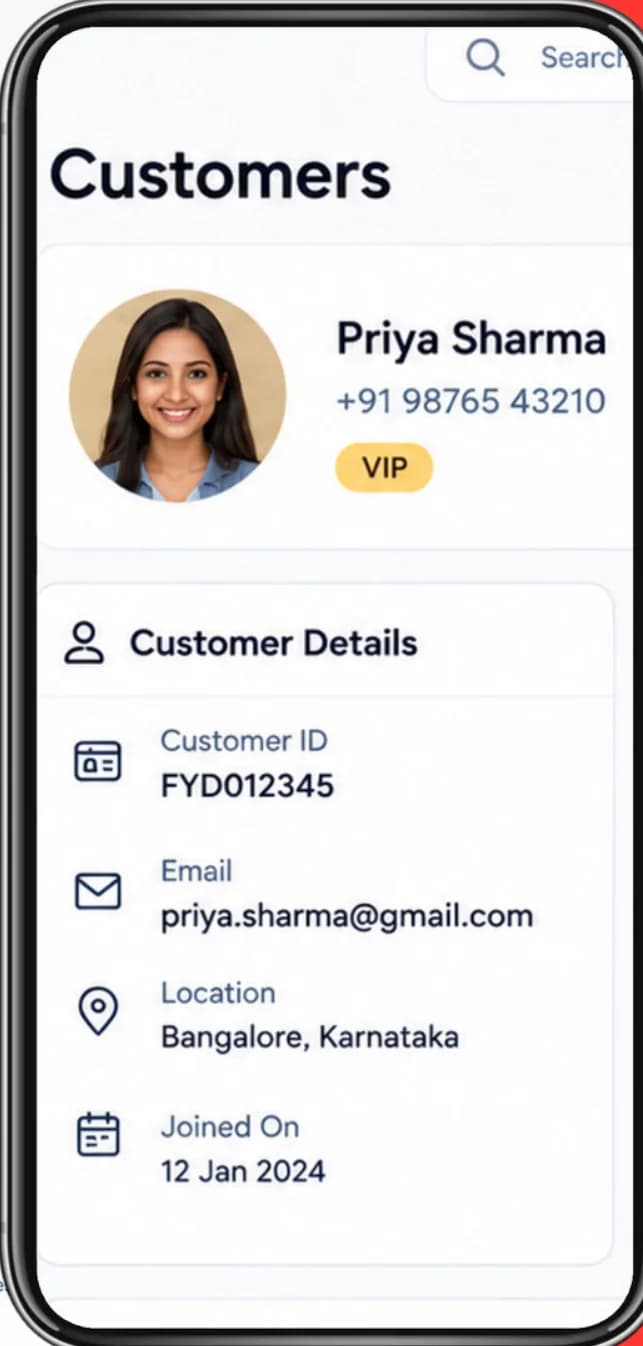
  • Who they are. Name, phone number, customer ID, email, location and when they joined.
  • How much they spend. Total spend, number of visits and the average purchase.
  • What they bought. A list of past purchases with dates and amounts.
  • Their group. A tag such as VIP shows how Fydo sees them.
A customer profile on the Fydo Partner app on a phone.
5

Know the groups

Fydo groups customers by how they shop:

  • New. First-time visitors.
  • Repeat. Customers who have purchased more than once.
  • VIP. Your highest-spending customers.
  • At risk. Customers who are visiting less often.
  • Lost. Customers who have not visited in 30+ days in the current setup.

The next guide shows how to use them.

Names and rules
6

Ask three questions every week

You do not need a spreadsheet. On the home screen, look at today's collection, new customers, repeat customers and how much loyalty or cashback was used. Then ask:

  • Who is new this week?
  • Who came back?
  • Who is slipping away?

Read a customer list

Select a customer to see what the numbers mean and what to do next.

Customer list

CustomerGroupVisitsSpentLast visit

What it tells you

Visits often and spends the most. One of your best customers.

What to do next

Thank her, and send early access or an exclusive offer to your VIP group.

Your checklist

Tick things off as you go. Copy the list to share it with your team.

Customer data checklist

0 of 7

Ticks are saved in this browser only.

Common mistakes

Easy to avoid once you know them.

  • Messaging imported customers without consent

    Check that they agreed to hear from you before you send anything.

  • Looking only at total sales

    Sales hide whether customers are new, loyal or slipping away.

  • Ignoring the at-risk group

    It is the cheapest group to win back.

  • Treating every customer the same

    A new customer and a VIP need different things.

  • Checking once a month

    A weekly look takes five minutes and catches problems early.

Questions about this guide

Keep going

The next step in the learning path.

Previous guideHow to record a bill at the counterNext guideHow to segment your customers

Related product pages

Customer IntelligenceA customer intelligence platform for shops: build customer profiles, group customers, see behaviour and value.Marketing CampaignsRun customer retention campaigns for your shop: promotional offers, win-back messages and more.Win-back campaignsBring lapsed customers back with the right message and offer.

Want to see it with your own shop?

A demo is the fastest way to see how these steps fit your business.

Back to all guides