
Fydo Logo
  • Pricing
Get a Free Demo
Loading
WhatsApp
Fydo Logo

Built for Shops

Loved by Shoppers.

Loved by those who sell. Loved by those who shop. Loyalty, the Fydo way : )

Get AI summary

Product

Loyalty ManagementWhatsApp MarketingCustomer CampaignsReferral

Solutions

Fashion & ApparelSalons & BeautyJewellery ShopsGrocery StoresRestaurants & Bars

Company

About usContact UsPartner with FydoTerms and ConditionsPrivacy PolicyRefund Policy

© Lfyd services private limited • All rights reserved

  1. Home
  2. Resources
  3. Guides
  4. Create a WhatsApp campaign

How to create a WhatsApp campaign

Four steps: write your offer, choose who sees it, choose when, and send it on WhatsApp. Here is how it works in the Fydo Partner app.

Get a Free DemoAll guides

Before you start

What you need, and what you will be able to do.

  • Time15 minutes
  • LevelBeginner
  • SourceBased on the Fydo Partner app

You will need

  • At least one programme or offer in mind
  • A customer group to send it to

You will be able to

  • Tell automatic and custom campaigns apart
  • Create a campaign in four steps
  • Preview the WhatsApp message before it goes

The steps

Follow them in order. Each step shows the real app screen where there is one.

In this guide
  1. 1Know the two kinds of campaign
  2. 2Start with one clear goal
  3. 3Add an offer
  4. 4Choose who should see it
  5. 5Choose when to send it
  6. 6Send, then look at the result
  • Build a campaign
  • Your checklist
1

Know the two kinds of campaign

Automatic campaigns run on their own once you set them up: a welcome message, a birthday message, an anniversary message, a win-back message for customers who have gone quiet, and a Google review request. Custom campaigns let you act whenever you want, for an offer, a promotion or an idea.
Birthdays and anniversaries

These messages need the dates to be recorded.

2

Start with one clear goal

Decide what you want a customer to do after reading the message. Come in this weekend? Use a reward? Leave a review? One message, one action.

3

Add an offer

Choose what goes with the message:

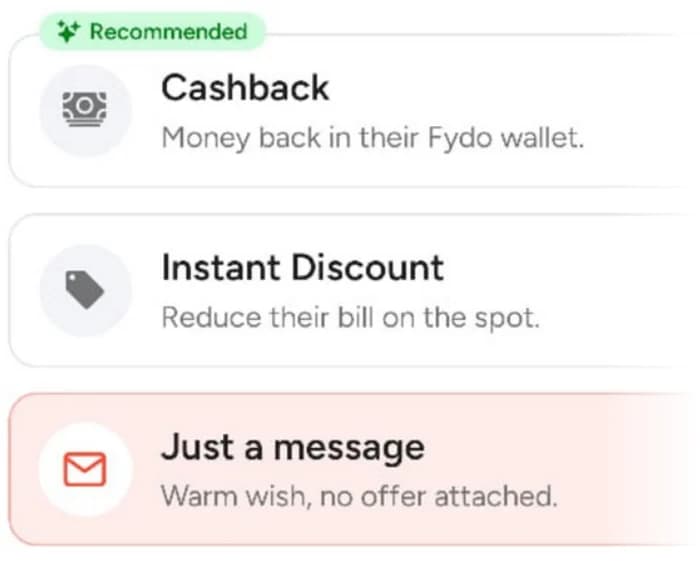
  • Cashback. Money back in the customer's wallet. The screen marks it as recommended.
  • Instant discount. Reduce their bill on the spot.
  • Just a message. A warm wish with no offer attached.

The screen points out that a warm message works, but a small reward gives people a reason to act.

Which offers a campaign can carry

The offer screen lists cashback, instant discount and message only.

The offer options on the Add an offer screen: cashback, instant discount and just a message.
4

Choose who should see it

Pick the customer group you want to reach. The segmentation guide explains the five groups.

5

Choose when to send it

Send straight away, or plan it for the right day and time.

6

Send, then look at the result

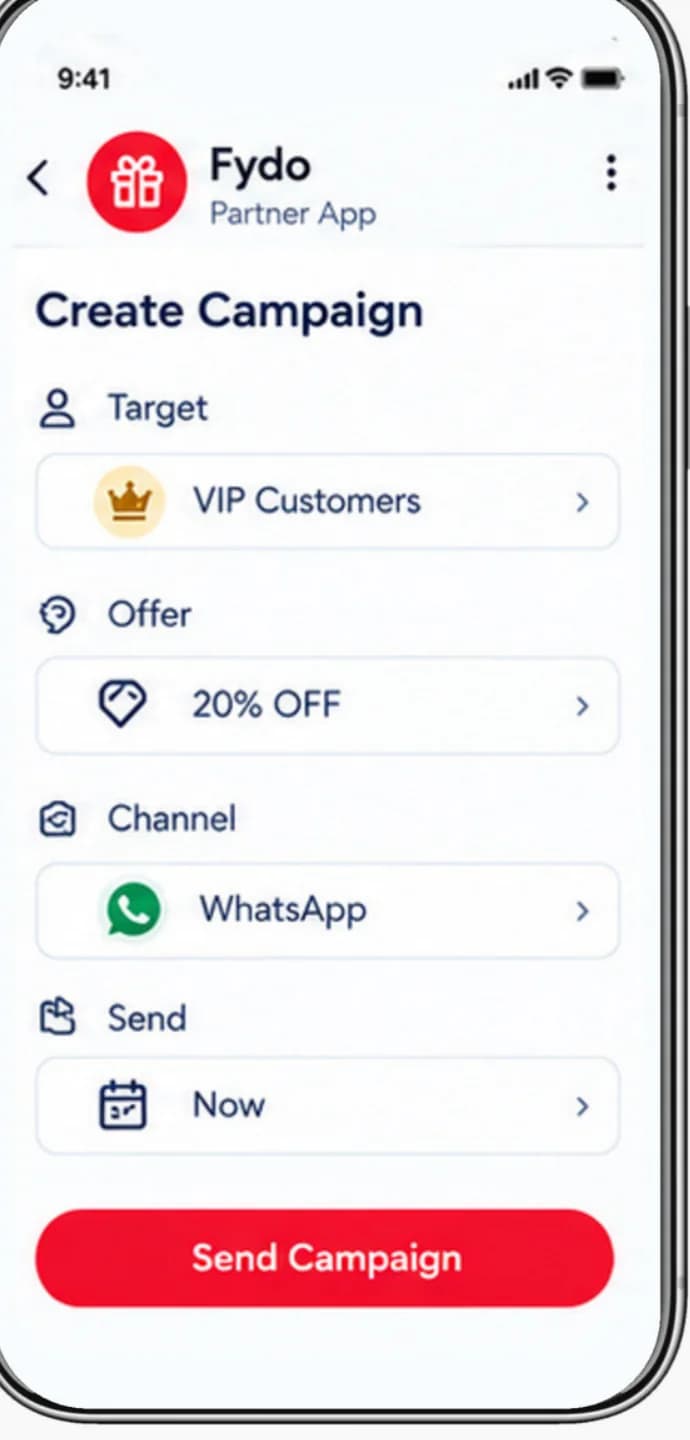
Tap Send Campaign. Fydo sends it on WhatsApp to the customers you chose. A week later, look at repeat customers and rewards used.

WhatsApp costs money

WhatsApp charges businesses for some kinds of messages, and promotional messages are charged per message. Confirm your credits and costs with the Fydo team before a big send.

The Create Campaign screen with the Send Campaign button.

Build a campaign

Choose a group, an offer and a time, and see the message a customer could receive.

1. Who should see it?

2. What do you offer?

3. When should it go?

WhatsApp charges for some message types, so confirm your credits and costs with the Fydo team before a big send.

Create Campaign
Target
VIP customers
Offer
Cashback
Channel
WhatsApp
Send
Now
Send CampaignSends as soon as you tap Send Campaign.
9:41
M
Message previewBusiness chat
Exclusive for you, Priya: extra cashback on your next visit this weekend.10:00 am

Your checklist

Tick things off as you go. Copy the list to share it with your team.

Campaign checklist

0 of 8

Ticks are saved in this browser only.

Common mistakes

Easy to avoid once you know them.

  • Messaging everyone

    The wrong people get an offer, and you pay for every message.

  • Messaging too often

    People stop reading, or opt out.

  • A vague offer

    Say exactly what the customer gets and by when.

  • No deadline

    Without a reason to act now, people wait.

  • Messaging people who have not agreed

    Check consent before you send.

Questions about this guide

Keep going

The next step in the learning path.

Previous guideHow to segment your customersNext guideHow to increase repeat purchases

Related product pages

Marketing CampaignsRun customer retention campaigns for your shop: promotional offers, win-back messages and more.WhatsApp MarketingCampaigns, offers and notifications on WhatsApp.Win-back campaignsBring lapsed customers back with the right message and offer.

Want to see it with your own shop?

A demo is the fastest way to see how these steps fit your business.

Back to all guides